

pendingReason vocabulary that says what it’s waiting on and whose side owns the wait, a buyer-safe errorCode when something failed, and a reference each party can quote to the other. This guide walks the same buy from both sides.
- Buyers get there in one call — see I’m a buyer.
- Sellers get three read-only surfaces in chat or REST — see I’m a seller.
- Either side can escalate to Apostra with a reference the other side already has — see What Apostra sees.
I’m a buyer — why isn’t my buy live?
One-call lookup
GET /api/v2/buyer/media-buys/{mediaBuyId} (the get_media_buy operation, callable via api_call) returns one media buy with its full why-visibility field set. Use this first — it answers in one call instead of re-reading the campaign.
mb_h3ctv001 and the sf: reference are illustrative — substitute your own media buy’s id.) These fields also appear on the nested media buys in GET /campaigns/:id and on the media-buy status poll — this is just the fastest single-buy path to them.
pendingReason — what it’s waiting on, and whose side owns it
pendingReason is a derived annotation, never a status — the buy’s status is unchanged; this just explains the wait.
See Media buy lifecycle for the full model, including how a buy’s AdCP status, this annotation, and cancellation approval interact.
errorCode — ownership and the seller’s own words
When forwarding failed or the buy was rejected, errorCode carries one of a small buyer-safe set, paired with errorOwner (who owns the fix) and — when the source or reviewer provided one — their sanitized sourceMessage:
sourceMessage is the first detail to read. It contains a sanitized explanation from the source or reviewer, or buyer-safe correction guidance from the storefront forwarder.
Submitted seller tasks
When a seller accepts a create asynchronously, the buy staysPENDING_APPROVAL while the worker polls that seller task with backoff. A completed task supplies the source buy and package details. A seller rejection becomes REJECTED, releases the campaign commitment, and exposes the seller’s sanitized sourceMessage.
When a storefront accepts a cancellation but its source has not yet confirmed it, the buy moves to ENDING instead of CANCELED. It remains live for campaign-budget commitment purposes while the worker reads back the source result. Only a seller-reported terminal status releases that commitment.
If the recovery deadline passes without terminal seller evidence, a create remains PENDING_APPROVAL and an accepted cancellation remains ENDING; either gains an additive reconciliation marker. Creates use reason: "seller_task_deadline"; cancellations use reason: "seller_cancel_deadline". This is an operator-owned attention state, not a seller terminal: the campaign commitment and the seller task handle remain in place, but the ordinary background worker stops polling it. The buyer or operator can call the campaign media-buy status refresh again to re-poll the seller; quote the buyer reference and stored seller task identifier when asking the seller to return terminal task evidence or confirm a cancellation. A seller webhook, successful re-poll, or confirmed seller cancellation that reports REJECTED, FAILED, CANCELED, or COMPLETED clears the marker and is the only thing that releases the commitment. V3 get(kind: "media_buy") keeps phase: "pendingApproval" for a create; an unconfirmed cancellation retains compatible phase: "active" and adds ending: { reason: "canceled", since }, alongside the additive reconciliation object when needed. A completed task that supplies no packages follows the same path rather than being silently logged.
forwardedAt and buyerReference — what to quote to support
forwardedAt is when the buy was sent to its inventory source(s) — absent if it hasn’t been forwarded yet. buyerReference (sf:<storefrontId>:<mediaBuyId>) identifies this buy’s exchange with the seller. Quote it, together with forwardedAt, when contacting the seller or Apostra support about a stuck buy.
Transition notifications
The same facts push to your notification stream asmedia_buy.* events, fired once per transition:
Each payload carries
mediaBuyId, buyerReference, and the applicable pendingReason / errorCode / errorOwner / sourceMessage — a reacting agent doesn’t need a second call to learn why.
Sample queries
Sample agent prompts
“Check why media buy mb_h3ctv001 isn’t delivering and tell me whose side it’s on.” “Use api_call to get media buy mb_h3ctv002 — what’s the errorCode, who owns fixing it, and what does the source’s message say?” “Is my CTV buy on Premium News actually live yet? If not, tell me the pendingReason and when it started waiting.”I’m a seller — what needs my attention?
Three read-only surfaces answer “what do I have, where is one stuck, and what needs work” — each available as a REST endpoint and as an in-chat surface. Open them from the rail’s Operate section, or just ask Murph.Media buys — every buy on the storefront
Ask “show me all my media buys” or “show me everything that’s up”, or callGET /media-buys. It returns every buy — routed and ESA-managed — sorted by urgency: buys still waiting on someone whose flight starts within 48 hours (or has already started) come first.
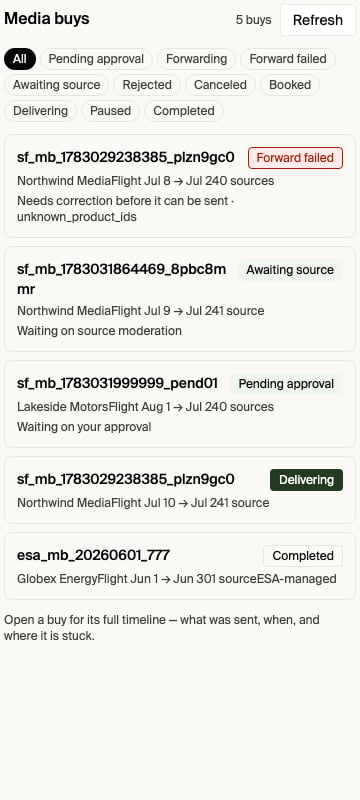
status (a platform list-view convenience, never an AdCP status), the raw sourceStatus, the same pendingReason vocabulary buyers see, the errorCode of the latest failed exchange, and the forwardOutcome.
Media buy timeline — what was sent, when, and where it’s stuck
Ask “what did you send Meridian Ads for buy sf_mb_example_9f2a1c and when?”, or open the buy’s timeline directly.GET /media-buys/{mediaBuyId}/timeline traces one buy end to end:
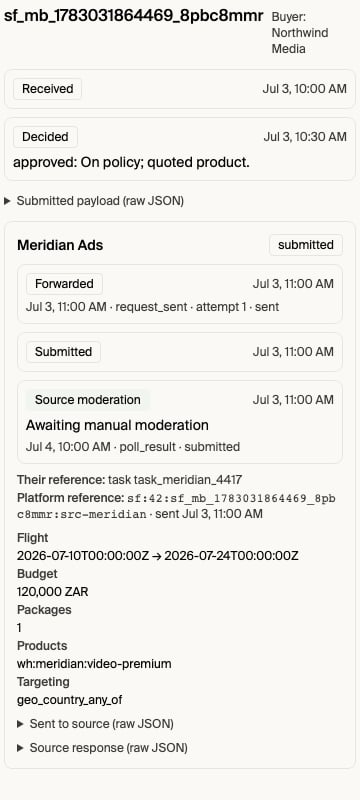
{"pruned": true} means retention removed the stored bytes; the slim event record stays indefinitely.
payloadHighlights.targetingKeys summarizes targeting dimensions from both
the request-level overlay and every package-level overlay. It reports keys,
not buyer-authored values; for example, a signal-targeted package includes
signal_targeting_groups.
Whose reference to quote to whom:
Your ad server holds different settings than the buy booked
For a Google Ad Manager–backed managed sales agent source, a buy becomesactive only after Google Ad Manager confirms the line items hold the booked spend cap, pacing, price, currency and flight dates (see waiting for the ad server to confirm). If a line item holds something else, such as an unlimited goal instead of a lifetime goal sized from the budget, the buy stays pending even if the order is approved and delivering. Apostra’s operations team is alerted with the expected and actual values and will contact you. Correct the line item or the product’s ad server configuration so it matches the booking. The next readback promotes the buy.
Pending operations — everything waiting on someone
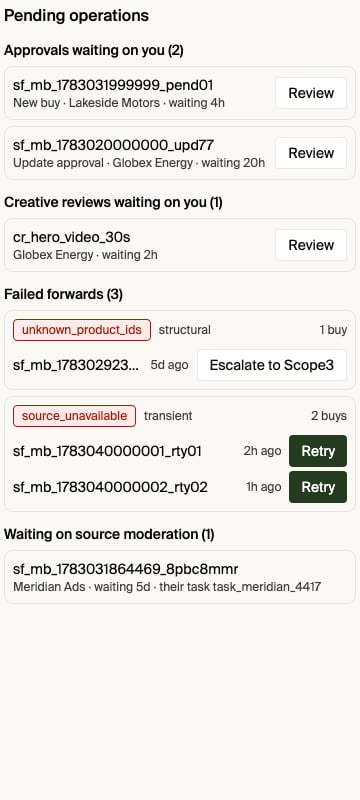
Ask “show me everything pending”, or callGET /pending-operations. It opens the portable Pending Operations Page and unions work in flight, grouped. A group appears only when it’s non-empty: approvals, creativeReviews, failedForwards (grouped by error code), awaitingSource, updatesAwaitingSource, creativesAwaitingSource, manualSourceWork, sourceDegradations, and gamCleanups. Each pending item says who it is waiting on (you, the sales agent’s operator, the buyer, or Apostra) and since when, so you can tell at a glance whether the next move is yours; see Pending operations. Row actions open the exact Approvals, timeline, retry, or source-diagnostics surface without generating another chat prompt. A listed GAM cleanup uses an explicit two-step archive or manual-cleanup confirmation in the Page.
Recovery classes: why some failures have no retry
Every forwarding failure carries a recovery class, and the class — not optimism — decides which action is offered:
A
transient failure whose retry window lapses is treated as terminalized and also becomes escalate-only.
Status changed directly in your ad server
For an ad-server-backed (ESA-managed) source, your ad server holds the truth. If you approve an order directly in the ad server — say you approve a GAM order outside the storefront’s approval flow — the storefront won’t see that change until the source next syncs, so the buy can keep showingpending_approval while the order is actually approved and delivering. A source refresh reconciles it: it re-checks every non-terminal media buy (pending_approval, pending_start, paused) against the ad server and corrects any status that drifted. Ask Murph to “refresh my [source] source” (or “the GAM order is approved but the buy still shows pending — refresh it”); Murph triggers the refresh and reports the reconciled status. You don’t need to escalate for a status that the ad server has already resolved.
This does not cover a buy that already shows a terminal buyer-facing status like REJECTED — that’s outside the refresh’s non-terminal scope and needs a separate retry/reconciliation action, not just a source refresh.
Sample agent prompts
“Show me all buys that are up.” “Show me everything pending.” “What did you send Premium News Network for buy sf_mb_example_9f2a1c, and when?”What Apostra sees
Every exchange between the platform and an inventory source is durably recorded, so support can trace any buy end to end from the same references you already have — no ticket that starts from scratch. When you escalate, quote yourbuyerReference (buyers) or the sf: idempotency key together with its request timestamp (sellers); that’s the same handle Apostra uses to pull up the exchange.
When a storefront media-buy identifier can belong to multiple buyers, Apostra
support also uses the buyer customer ID to select the intended buyer-scoped
trace; the platform never guesses between matching transactions.
Platform Activity for Apostra support
Authenticated Apostra staff can investigate supported incidents in Admin → Platform Activity without SuperAdmin, Kubernetes, database, or cloud-console access. Search with any request, activity, trace, run, or session ID to find the related platform activity. For proposal failures, paste the proposal execution ID to see the cohort state, each seller’s attempt status and timing, bounded error details, and associated query IDs. The diagnostic response is deliberately redacted. It does not expose request or response payloads, credentials, idempotency keys, customer-authored text, or seller outcome prose. Access is limited to Apostra employees and SuperAdmins; test identities and customer users cannot use these routes. Platform Activity currently covers platform requests and proposal-worker executions. For another asynchronous workflow, or when no matching record is found, continue using the existing Platform Engineering escalation path and include the correlation ID and timestamp.Related
Media buy lifecycle
The AdCP status enum,
pendingReason, and how the three status surfaces relateMedia Buy
The buyer media-buy object, including the full why-visibility field reference
Media buys & pending operations
The seller-side REST reference for all three surfaces in this guide
Notifications
Configuring where transition events are delivered